On a lighter note…

IOS 26 logo-3903750623.I’ve got all my Apple devices set to automatically update. 

Last night I noticed my iPad telling me that there was an update to the current iPad OS and an update to iPad OS 26. 

Without thinking I pressed the update this evening button. In retrospect I seem to recall that I wanted the latest security update to my current iPad OS, but I probably “Fat Fingered” it and said do iPad OS 26. I couldn’t figure out how to undo the selection and figured, “what the hell”. I went ahead and answered all the new OS questions then put the iPad down. I even remembered to plug it in.

This morning I’ve got a single device that’s got the new OS 26. That includes the journaling app. So now I can type with an actual keyboard to make journaling entries instead of using iPhone mirroring.

Much more direct and a pretty nice experience.

After playing around with the new OS, for a while I decided, “What the hell?” I’m in the process of updating all the devices in the house.

Highlander rules apply, “There can be only one!”

This is going to take some time. The computer, phone, HomePods, and Apple TVs are pushing the router and my fiber connection pretty darn hard. Having the iPad already updated makes the HomePods easier because it can initiate (and monitor) that process without worry of it rebooting.

In a few hours, I’ll have a unified OS experience and if it screws up, I’ve got yesterday’s backups. Wish me luck.

While I’m waiting, I can use the iPad for other computer things that need to get done.

Generally I like the new OS on the iPad. I’ve had to make some tweaks to the Home Screen and it’s different when I switch from one app to another. I’m not sure I like that as much as the old way, but it’s not a show stopper and it may just be that I’m used to the old way. Some of the apps are hanging around on the very edge of the screen. It’s not like “Stage Manager” but it looks like they’re trying to remind you that something else is running in the background. Or it could be a bug. I don’t know for sure. I’ve seen my iPad do this kind of thing in the past and restarting it made the problem go away.

I should have restarted the iPad after the update was complete. I’ll do that as soon as I have another device up & running completely.

The Liquid Glass appearance is nice although I’ve gone for a solid appearance of the time when I first open the iPad case. The liquid appearance is a little too busy due to my background.

If you can’t reach me for the next hour or three. Leave a message. 

Have a good day.

Tomorrow is new OS day

I was going to say Apple Christmas, but that actually starts on the 19th or a couple of days later when shipments of new iPhones start showing up.

Looks like this year I may update my Ultra. It’s got the O2 Sensing back online although it’s not on device like it was in the original Ultra. They’ve supposedly shifted the computations over to the iPhone to get around Massimo’s patent lawsuit.

Massimo has responded by filing suit against that too. But the sensors are still there, the appeals are still pending, and Massimo hasn’t figured out that they could make a hell of a statement by simply saying, “Hey, we’re a healthcare monitoring company. We make a ton of devices used in the medical industry and are interested in making everyone’s health better. To that end, Apple can use the disputed technology freely with the proviso that they make mention of our company’s technological innovations. Upon which the blood O2 sensing in the Apple Watch is based.”

It would be a hell of a PR move, save everyone time and money, end a bitter dispute, and put Massimo front and center, in a positive light. Yeah, Apple may have gotten away with something, but the larger win might be worth it and their case may have been enough to make Apple less likely to play around without paying patent royalities.

At this point the only people getting rich in this dispute are the legal firms anyway.

There are rumors that Massimo is spinning off their consumer monitoring device into a separate company or division, probably in an attempt to isolate their actual medical division from the legal conflict.

I’d bet Apple would go for it. America is the only country where they have to disable the onboard sensors. I’m not sure, but I think the EU courts told Massimo to go pound sand.

The new Ultra has other features that make it a decent upgrade to the Ultra v1.

Still deciding about it. And I’ve got plenty of time. Pre-Orders are reporting 8 – 12 weeks out for delivery. I’ll be interested to see what the initial reports are from people who get the first units.

The iPhone 17 Pro is also interesting. It seems that I’m only interested in iPhones when they have blue as an available color. The cameras (front & back) are vast improvements over what I’ve got in my current phone. The battery life and cooling system are also of interest. My phone gets a little toasty in some use conditions. Fortunately, I don’t encounter those conditions often enough to have it be a pain in my butt, however it would be nice to not have to concern myself with those situations at all.

I’ll give it some thought, maybe I’ll just wait for another “Blue” year.

Given the change back to an aluminum frame, maybe I’ll wait & see what the real world usage feedback is, before making a move. It’s a very expensive product and if mine is working fine, perhaps waiting another couple of years wouldn’t hurt.

Probably the most interesting thing is the AirPod Pro 3. I really like my AirPod Pro 2s. They’ve been out for a few years now. It’s likely the improvements will make me demand Apple take my money.

Better heart rate sensing during workouts would be welcome. I’m pretty confident I understand why my heart rate is all over the place when I’m walking or doing other activities in colder seasons just using my watch. Perhaps a secondary set of sensors would prevent the dropouts. But cold is cold and the human body is always going to divert blood flow away from the body surfaces to maintain core temperature.

It’s possible the ear canal works the same way. Equally possible is that heart rate measured at the ear canal would be less affected, since the body is going to keep the brain fed as a priority.

The improvements to sound quality is a win, and translation functions might be very interesting. I wonder if people will be less likely to be nasty if they realize everyone around them knows what they’re saying even if it’s in another language? Likewise, I wonder if Apple translation will be adapted to translate some of the urban speech that now sounds more like another language as well.

Rough math, if I updated everything. It’s the cost of a new laptop. Wow!

Then again, the power of the phones in our pockets has eclipsed the first few laptops I owned very significantly.

The question probably comes down to “So I need that kind of computing horsepower in my pocket, or on my wrist?” Better questions to ask might be in the arena of tracking, and privacy. Having a smart assistant in my pocket opens the door for having that assistant “rat me out” to someone who is not my friend.

I’m not sure I’ll update to the new OS immediately. Maybe I’ll wait for my devices to do it automatically. It’s likely that waiting for the automatic update to take place will take a week or so, that might allow me to avoid the inevitable first release bugs.

We’ll see.

Well now I’ve got their attention.

Microsoft Word Logo.Microsoft increased their “Personal” subscription price for Office 365 from something like $65 to $99 per year.
I’ll admit that’s not a lot of cash.

The problem is I barely used Microsoft software.

Outlook wasn’t any better than the mail client supplied with MacOS. The Apple email client works instantly and easily across all Apple devices. For its faults, it is reliable and doesn’t require for you put your contacts on Microsoft servers to be blasted across all their properties like LinkedIn and such.

In the entire time I’ve had Microsoft office, I don’t think I ever used PowerPoint for anything personal. I used it at work, but not at home. Excel, got more use, but not enough to justify the cost.

Word was about the only application I used with any frequency. As Word has evolved, it’s become less pleasurable and more annoying to use. So I wasn’t using it as much either. I was using Pages, Ulysses, or Scrivner. The latter two are configured more for writing things like stories. They’re clean and focused on their purpose. 

As I looked at the renewal. I realized it was the same price for 4 applications on a Mac as the price for what? 6 applications on Windows, and that I was really only using 25% of the Mac applications, I decided not to renew.

I made the decision about a month ago. The expiration date came & went. I’ve removed the Microsoft applications from my devices and now, I’m getting email notifications saying my subscription has lapsed and I should re-subscribe immediately to regain the benefits provided by their products.

Nope. Not interested. I’ve got a decent desktop publishing application, and Apple’s Pages for word processing documents. What Word or Pages couldn’t or can’t do, the desktop publisher can. Apple’s Numbers, and Keynote handle spreadsheets and presentations.

I’ve never used Keynote either. Nothing against it, I just don’t do that kind of presentation thing. I could, but why? I’m not presenting anything to anybody these days.

All the Apple apps read Microsoft formatted documents, they can output Microsoft compatible files and PDF documents if I need to share something, and they’re free.

Plus, I just saved 3 GB, (4 GB if you count Outlook which I’d purged a long time ago,) of space on my internal drive.

The Apple products all have the ability to back up versions, and like the Microsoft versions can save their data to cloud based storage. In the case of Microsoft, they insist that you use their cloud and refuse to turn on backups of documents unless the document is saved in their cloud.

Apple products likewise prefer to save their documents in the Apple Cloud which is end to end encrypted, and which through the use of Apple’s AFP system are encrypted in the cloud so that supposedly, even Apple can’t hack them.

I never much liked Microsoft’s cloud solution either and therefore didn’t use it.

This leads me to wonder about maintaining Windows on my Mac. Most of the apps that I routinely use are available on the Mac, so the reason for maintaining VMWare and running Windows is greatly diminished. VMWare having been sold and their subsequent moves regarding VMWare Fusion (the Mac VMWare) also calls into question the necessity to allocate 40GB of disk storage there. I don’t recall the last time I fired up VMWare or the Windows system. It’s Windows 11 which is okay, but there’s not much point in having it, if I’m not going to use it.

Thinking about it, and that my job search is going nowhere, maybe I should just back it up to the NAS and flush it from my Mac. If I need it, I can pull it from the NAS, if I don’t need it, It won’t be taking up space needlessly and I’ll know the answer.

Besides, it might be better to do away with VMWare and instead go to Parallels in the event that I need Windows on the Mac. Perhaps a better solution would be that if due to employment needs, I need a Windows machine, I just buy a cheap assed Windows laptop. Those are a dime a dozen.

This may be a stepping off point from Microsoft for me. They have nothing that I can’t get elsewhere. I have to point out that Pages, opens native Word docs faster than Word does on my Mac. That’s pretty darn interesting.

Wow, That was annoying!

Holy Shit! What a pain in the ass!

So I’m changing doctors. This guy is recommended and far more local to me than the guy in San Diego. I hadn’t switched previously because, well anything to do with the Medical industrial complex is always a royal pain in the ass. I figured I’d spare myself the annoyance until I really needed to deal with it.

Welp, it’s that time.

I initiated the “Get to know you,” appointment. It’s next Wednesday.

The practice sent me an innocuous reminder text. Okay, at least it wasn’t the 3 text reminders, 2 phone calls, and 2 emails that the BMW dealer sent me about the car service I’d scheduled. 

Do people just not keep any appointments anymore?

I clicked on the little link and was taken to their patient portal on my iPad. (I’ll often use my iPad like this as a firewall keeping my phone and computer isolated. Because it’s a lot easier to deal with flushing and reloading the iPad than the other two in the event it’s a scam.)

Their link took me to a patient intake form. Okay, that was reasonable. I could fill out all the bullshit ahead of time instead of doing it on an annoying clipboard in a waiting room full of sick people, wondering what exactly I was being exposed to as however many of them tried to hack up one of their lungs. 

Things were humming along nicely until I got to a couple of screens that presented no exit. Their software vendor had neglected to consider the possibility that a patient would be using an iPad with one of Apple’s Magic Keyboards.

Rotating the iPad didn’t reveal the “NEXT” button because I’d already begun entering data in the landscape format the Magic Keyboard presented data in.

So screwed! I tried handing off the input to the computer, but their wondrous Indian programmers must’ve thought that wasn’t something anyone would do, so they’d locked that out. I couldn’t scroll further up because again, the wondrous Indian programmers never thought about accessibility and what might happen if they’d misread the screen size. If someone had accessibility turned on, with the text being larger, then the user would be locked into a frustrating situation as well.

I reinitiated the session on my computer from scratch. In the full web page I could access the “NEXT” button. Okay… Moving on.

On the full size display they presented a typical “left hand” menu. In fact it was a progress bar not a menu. So while it looked like you could go back to correct mistakes… Nope! You couldn’t. You could restart a section, losing all the data you’d entered but you couldn’t just step back a step.

For example, They asked about hospitalizations, then they asked about surgeries. I couldn’t see the surgeries section until I’d completed the hospitalization section. SO the form is incorrectly filled out because in both cases surgeries were performed in hospitalization settings under anesthesia.

Then I couldn’t go back to actually fix the issue by entering the hospitalization dates followed by the surgery types and dates.

Annoying!

Don’t even get me started on the upload of ID and insurance card. The insurance card had a “Cropping feature” that didn’t work correctly. And the Insurance section did not properly scan the insurance card nor did it allow me to fill in the missing data.

Sigh…

Shitty software really pisses me off. 

It’s a damn good thing I wasn’t doing a LIVE BP reading.

Then they wanted signatures. Which would have been easy on the iPad but I wasn’t filling out the forms on the iPad. 

The iPad and Mac have a nifty function that will allow you to use an Apple Pencil to sign forms displayed on a web page. You can tell the computer to access the iPad for a signature. However the glorious Indian programmers had once again disabled that function.

What they in their infinite wisdom had not disabled was the ability to hand the web page displayed on the computer to the iPad so I pushed it all back to the iPad and provided the requested signatures.

Moving On…

Later in the process I encountered the “Next” button issue again. But guess what? I couldn’t had the iPad data back to the computer.

Okay… reinitiate the process on the computer and hope that the entered data had actually been posted to the profile.

Most of it was saved, so back to using the computer.

Moving On…

Finally I got the whole shebang filled out and figured I’d correct whatever was fucked up when I got to the damn appointment.

Then, they wanted me to download their patient portal app on my phone. OH GOD…

That went fairly smoothly, since I knew what kind of bugs were likely to crop up.

On the phone app, instead of a password, they wanted a 6 digit PIN.

I ask you, what the fuck is the point of a PIN when you’ve already saved a perfectly good password in the apple passwords application, and that application is more than capable of presenting that password across all apple devices? Just another fucking thing to remember!

There’s 2 hours of my life I’ll never get back, but it’s done. 

This kind of thing is exactly why you need a manual tester to actually look at software before you publish your bullshit to the world.

There are a lot of people my age for whom this would have been too daunting to complete. I also have to ask, “Why did I give all this information to their clerk when I made the fucking appointment? None of it was entered into their system!” Equally I’m curious why medical expenses are so high if I’m doing the keyboard entry for them. I ask the same question using self checkout at stores.

I’ve started not paying for bags, even though I use them. If I’m doing the work of a cashier, the least they can do is let me take my earnings in a couple of bags.

While I was off the hill the other day getting the car serviced I took care of another little medical annoyance.

I needed to pick up a RX from Walgreens. I’d chosen the Fontana location since it was relatively close to the house. It was a cluster fuck of EPIC proportions. 

I’d placed an RX request via their application on Monday. They sent me an email saying it would be ready on Wednesday and there I was on Thursday trying to pick it up.

They had it, one bitch had it in her hand, a full 90 day supply but even after taking my insurance info, confirming that I could have the RX, they told me I’d have to come back one hour later because they were closed for lunch. Uhhh I was right there, they were right there, the medication was right there and it was 15 minutes till their lunch time.

Their whole process was a complete clusterfuck. Fine! I had lunch, paid $3 for a bottle of coke and $11 for a mostly bread sandwich and waited.

When I was done with lunch, I wandered around the Walgreens, sizing them up for other supplies. I picked up some Flonase while I was there. Then waited in line for another hour to get my ZERO charge bottle of meds.

The delay put me in shitty traffic all the way home.

Walgreens, is probably not going to be my pharmacy of choice. Or at least not THAT Walgreens. It was 107° down there. By the time I got home I was drained. I couldn’t think, or concentrate.

So I lost another day.

I need to find a way to get 90 day prescriptions because I don’t want to have prescription anxiety. You know, “Oh I can’t leave yet, I have to wait for the RX to be authorized and I’m allowed to pick it up,” every month.

I intensely dislike going to pharmacies. I hate everything about their officious “See we’re medical people in our scrubs, we can make you dance hahahaha, we’re so important,” attitude.

No, you pack of idiots, you count pills from one bottle to another bottle. The hardest thing you have to do is decide what size paper bag to put those pill bottles in. The pharmacist is only one of you who has completed higher education.

Perhaps I’m just cranky! 

Next week is the Doctor’s appointment and we’ll be revisiting the BP meds, and other issues.

All I can say is this guy better live up to his reputation and the recommendations. Otherwise I’m going to be really cranky!

Some things I’ve learned living with my Apple Watch.

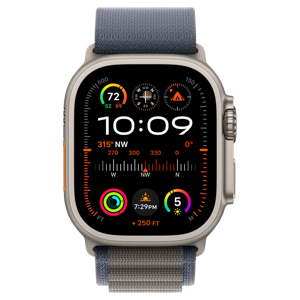
Apple watch ultra 2 front 2851321038.Over all I like my Apple Watch Ultra. I started with Apple Watches in the 3rd generation but the Ultra has been my favorite.
I’ve got a first generation Ultra and it’s been pretty darn good. There’ve been some bumps in the road but nothing too severe.

The battery is still holding up, although I’m starting to notice some age related degradation. Well within normal parameters for a battery that’s coming up on four years old.

The case and screen are still in good shape and I’ll swap bands from time to time just to give it a “New” feel.

As I’ve mentioned elsewhere I’m hanging onto this one because of the O2 sensor. I really wish Massimo and Apple would bury the hatchet so the new watches could have the feature back. That’s another story.

There are some things I’ve learned over time.

Apple rings are generally a nice feature. There’s a down side though.

All of the rings are somewhat iffy depending on circumstances. This leads to frustration if you’re the least bit competitive trying to get the monthly challenges or maintain a move streak.

I completely blew the March challenge off this year, because it was simply too unrealistic. If you’re injured, and competitive, fighting to “win” the monthly challenges can lead to further injury. 

The Move Ring is sometimes wildly inaccurate. Why for example on some days does the move ring rack up move points walking around the house and other days literally running around in the house barely moves the ring at all?

I haven’t figure that one out yet.

The Exercise Ring is significantly affected by temperature. It’s not the sensors, or the watch itself. It’s the way the human body reacts to heat or cold.

In Winter it takes a lot more effort to get the exercise ring to move. This appears to be due to my body trying to prevent heat loss.

The Exercise Ring and sensors are tied to heart rate, and in Winter or even a cool fall day, my body reduces the blood flow to my arms and hands. So the heart rate sensor can’t read my heart rate properly or consistently. This results in the exercise ring being harder to close. Tightening the band helps some, but it’s possible to have the band too tight as well.

In Summer the reverse happens. In an effort to cool down, my body pumps more blood to my extremities which results in having to adjust the fit about mid walk or hike. There’s an almost imperceptible swelling in my arms. This swelling makes the watch too tight and at some point if I don’t adjust the fit, heart rate data isn’t collected properly because the sensors can’t detect my pulse.

The Stand Ring is also interesting and inconsistent. I’ve had it misread, simply because I reached down to pet the dog from a seated position.

All of these issues can lead to frustration closing rings, keeping up with a monthly competition, or competing with someone head to head.

Which is to say don’t take any of this too seriously. The Apple Watch and rings should be a guide, I’d say even the monthly challenges shouldn’t be much of a focus. They appear to be designed as motivations, but sometimes it’s too easy to get focused on winning the challenge instead of using common sense.

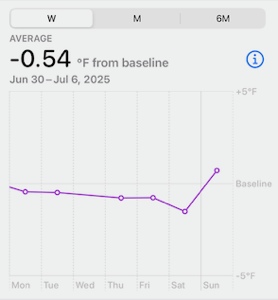
The same goes for Wrist Temperature. Primarily, wrist temperature seems to be linked to menstrual cycle tracking. Since I’m a guy, that’s not really a valid concern. I’m not likely to have that kind of cycle.

The watch knows I’m a male, so that measurement is more like a guide to my general health. If I’m ill for example, wrist temperature can lead me to breaking out a thermometer to check if I’m really running a fever.

I’d like to see more out of this sensor that catered more to male physiology.

For example, guys are notorious for “walking it off” it might be useful if the watch, knowing I was Male (genetically so), threw a notification if my wrist temperature was substantially higher than normal. Maybe something like “Hey, your wrist temp is a lot higher than normal, are you feeling okay? Perhaps you should take your temperature just to check.

We might tell our spouses, “Yeah I’m FINE!” But our watch nudging us to take a moment of self care, we might not dismiss so out of hand.

We’re likely to recognize that the machine is just bringing something to our attention like a check engine light. That being said, Summer / Winter variations appear here as well. Heavy blankets on the bed at night during Winter, or sleeping with nothing on us on a hot Summer night, change the base temperature average slightly.

I don’t think wrist temperature can be accurate in the moment. Monitoring significant deviations over a day or two might be useful. Especially for those of us that live alone.

Sleep tracking is also one of those areas I think could be better. I had an actual sleep sensor in my bed for a while. It died and when I went for a replacement, the company was gone. I think Apple bought them and don’t know what happened after that. 

The sensor was super useful and I didn’t have to wear my watch to bed. The sleep part of Apple Watch is kind of misleading. Unlike the actual sensor that was on when my weight was on it. The Apple Watch version is dependent on alarms and schedules. If I’m late going to bed, often the Watch starts recording that I’m “Sleeping” when in fact I’m not, so the data is skewed. Likewise if I silence the morning alarm and decide to sleep an hour or so later on a Saturday or Sunday morning, the sleep data is wrong.  Don’t even get me started on what the readings look like if the watch thinks I’m sleeping but in fact I’m having sex.

The bed sleep sensor wasn’t affected too much by normal human activities.

I’m thinking that another in / under mattress sensor is in my future. I like knowing that I’m feeling tired because I thrashed around all night instead of wondering why I feel like I went ten rounds with a bear. The watch sleep sensor just doesn’t capture things the way they are.

The Cardio Fitness score is affected by when you stop a workout. If you stop a workout when you actually are done, the cardio fitness score will be higher than if you stop a workout after you’ve gotten water, wandered around the gym to the locker room, or as in my case, gotten in the door, unleashed the dog, opened the back deck, gotten fresh water for the dog, unslung a backpack, and poured a glass of iced tea.

The watch is doing a calculation about how your heart rate changes from working out to resting. The greater the change in the minutes after ending a workout, the higher the inferred cardio fitness. So screwing up telling the watch the workout is over can result in a lower score.

This can be confusing if you’ve inadvertently changed your routine and suddenly your fitness score is declining, but you’ve got no good idea why.

Since I don’t have a gym membership I’ve not played with the Apple Watch connecting to Gym equipment. I’ll have a gym membership in a month or two as part of a new insurance policy. So I may update this post once that happens.

There’s a claim, that new versions of the Apple Watch this year may have some kind of blood pressure monitoring. In theory it’s not supposed to provide systolic/diastolic numbers but instead is supposed to provide warnings like “Your BP is high,” inducing the wearer to check actual numbers with a blood pressure cuff.

This is similar to the atrial fibrillation warning the watch can give the wearer now. Given what I’ve observed with the heart rate sensors I’m not sure how accurate or useful this coming feature will be.

I’m curious and looking forward to this year’s Apple Ultra. But I’m not sure I’ll buy one. I might just keep using my old faithful for another year or two.