
Not Sure if this is better… or worse.

I’ve been noticing over the last few months more and more “Cookie Notifications”.

Hell, even I post a cookie notification on this site.

I don’t collect or indeed look at the metrics provided by these cookies but the blog application collects them. I don’t monetize the readership of this blog, I’ve thought about it, but decided against it .

While I could use the money, ultimately it’s more important to be able to speak my mind without worrying about someone having leverage to force me to take down or apologize for a post.

I posted the cookie notification because you, the reader, have the right to know that information is being collected about you.

That being said, I’ve noticed while reviewing the various cookie policies of sites that I visit, a shocking amount of information is being collected.

The most egregious site thus far, is a site of an adult nature that I’ve enjoyed for many years. This adult site posted their cookie policy sometime in the past few weeks, (Hey, I enjoy the site, but don’t live on it.)

Reviewing their policy presented me with over 100 “Affiliate” companies all of whom set tracking cookies, share information about my interests, have access to my location as listed on site, and pretty much anything and everything I’ve provided about me. Given the nature of the site, the immense sharing of information is troubling.

On the one hand, they’ve probably always been sharing this information, such is the nature of monetization. On the other hand knowing what they’re sharing, and the breathtaking length of companies they’re sharing information with, gives me considerable pause.

Any reasonable adult knows (or should know) that sites of an “Adult” nature are risky by nature, these sites are “The Wild West” and often beyond the reach, or notice of law enforcement. These sites come & go without warning. If you’re a “Free” user they’re going to sell some of your information. After all, they’re in it to make money.

As a reasonable adult, we each must make a value choice. Do we really want to see what’s on the site versus how much we’re willing to “pay” to see it.

That thought leads me to question if these sites will make the next logical move. A move where paid membership affords you privacy from tracking and monetization. If the site is making money from memberships do they need to also share the member’s data?

I’d actually pay a membership fee, if I knew that I’d be excluded from having my peculiarities broadcast to hundreds of unknown advertising agencies attempting to target me with their wares.

Essentially, if you’re using a paid VPN service that’s what you’re doing when you’re surfing the web but not logged into Bing, Google, Yahoo, or whatever. Most of the people I know, use a “Burner” email address for questionable sites.

I wonder about all the information that’s already out there on us all as individuals. The genie is pretty much out of the bottle. Will I forever be followed by an ad showing ‘Fat bottomed Blow Up Slut doll’ because once in 2000 while operating my computer intoxicated, I thought it was interesting to click on that particular genre of ad?

This line of thought has also led me to wonder about my overall membership, free or otherwise on the small number of sites that I frequent.

Much as I’ve enjoyed the site I visited last night, do I really need to visit it, or any sites? I really appreciate their upfront attitude and transparency. For me that is a definite check in the “Plus” column. But as someone who tries to keep a low internet profile, (this blog not withstanding,) how much do I want to share?

Brietbart is an interesting case study in persistence. Almost every time I go to their site I’m being asked to accept tracking and cookies. Every single time I tell them they’re not allowed to sell my information and confirm that choice. But they keep asking, I suspect they’re hoping that one day I’ll just cave in and say “Accept All”. That is somewhat ironic because they’re always ‘banging on’ about freedom and privacy. Them constantly asking the way they do is also degrading the user experience and I find myself less inclined to visit their site at all.

Generally, the same is true, for me, of all websites. I’ve noticed that when I’m confronted with yet another “Cookie / Privacy notice” I’m more prone to not click beyond the notice, instead I’ll close the page.

Maybe that’s a good thing.

If people get tired of answering questions about cookies and tracking, perhaps they’ll stop relying on the internet for all their information… I doubt it.

I can say that since I’ve put the cookie notice up on this site, the traffic through the site has decreased. That data is gleaned not from cookies, but from a count of incoming ip addresses the site maintains over a 24 hour period.

From my perspective, the usability of the internet is degraded. It’s like getting gas at some gas stations or making a purchase with my debit card. I don’t think it’s reasonable to be asked if I want a car wash, to donate to this or that cause, do I want a receipt, or be shouted at with advertisements from a blaring screen, or whatever… I just want to get on with my day.

The internet is becoming another case of answer 50 questions get the simplest things done.

In that regard… I’m leaning more to closing accounts I don’t absolutely need and moving back to good old fashioned printed books and reference manuals.

I’ve been using cash for purchases a lot more lately. It’s really nice, transactions the way they’re supposed to be.

Some would say that’s a sign of paranoia.

For me, it’s about not wanting to be bothered.

When I was much younger, I worked at Radio Shack. We didn’t use a cash register, we wrote out orders on a receipt book and had only a cash drawer. We were supposed to ask each and every customer for their name and mailing address. Many customers, young and old refused to provide this information. It’s amazing to me how much has changed and in such a short time.
Things that run through my head

Continued use of Facebook, Twitter, Instagram, or any of the so called “social-media” platforms, yet complaining about their censorship is irrational.

If these platforms do not serve you, why are you continuing to put advertising money in their pockets? Why are you creating an audit trail of your activities for people who would be your enemies?

Do not look to the government to “make it better.” The only way these entities will stop, is if they are denied funding. The only way to deny them funding is to stop using their services.

Go out into your neighborhoods, meet real people, discover for yourself if the world and people around you are good or bad. Rely on the truth of your own experiences. You might be pleasantly surprised at the goodness of people, even if they don’t believe exactly what you believe.

Presumably, more than 1/2 half of the United States is right leaning, or asking the wrong questions, and therefore subject to censorship. From the global perspective, even losing 1/2 of a county the size of the United States would make a dent in these companies earnings.

What better way to demonstrate that free market economies dictate corporate offerings?

Social Media is certainly not what it says it is on the tin.

Just a thought.

Apple, You Kinda Screwed up…

From the moment that Apple HomePods were announced, I was interested.

That being said, I wasn’t going to pony up 600-700 bucks for a pair unless I could hear them. Therein was the problem.

You see you could look at them in an Apple Store you could play with the colorful Siri swirl. But you couldn’t actually hear them. Anyone who’s been in an Apple Store knows the chaos the customers endure to shop there.

People playing with every device at every counter. The loud talking, the kids shouting, the Apple Representatives talking louder to be heard over the din.

Boops, Beeps, suddenly loud music from various corners of the store, the Apple Training person giving a class, people trying to get their computers working, and asking endless questions about their new devices they’re in the process of setting up, all over the drone of the latest popular music that the store is playing to “enhance” the customer shopping experience…

You get the picture.

If someone wanted to hear the HomePods with music similar to what they actually listen to in a quiet environment they were pretty much SOL. Against the cacophony of the store there’s no way you could actually hear Mozart, or the delicate pluck of a string. There was no way to actually hear the speakers… Just the speakers.

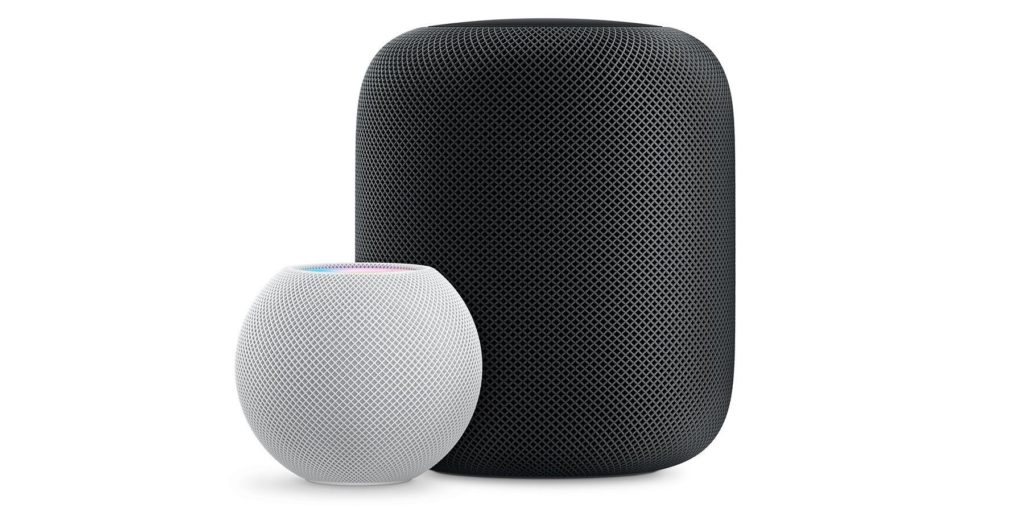
When Apple released the HomePod mini at $99 it put a HomePod device in the realm of buying one just to try it out. Worst case scenario the sound was crappy but you had access to Siri and could ask about the weather as you made coffee in the morning.

That’s how we came to have a HomePod mini.

We were astounded at the quality of the sound from such a little device. So astounded in fact, that we bought 3 more.

Several weeks after that, we were visiting a neighbor’s house and he had two full size HomePods. He also had a regular set of very nice speakers for listening to his vinyl collection.

I asked if he liked the HomePods. He said, “Yes, very much,” He went on to explain while switching off the turntable that they sounded great when he was streaming music and that he also had several HomePod minis scattered about the house in the bedrooms and his office.

Then he started streaming music to the HomePods.

The sound was glorious. Amazingly glorious, the room was filled with well balanced music. The bass was strong but not overwhelming and the treble was crisp and clear. Had I known what HomePods really sounded like in a quiet room I’d have bought a set shortly after they came out, and I said so.

Then the neighbor said, “If you want a pair you’d better hurry. Apple just discontinued them today.”

I was bummed out.

The other half who is not often impressed with speakers or reproduced music asked a few questions and I thought that was it. I’d missed out on something that was really great.

Two weeks after that a couple of boxes addressed to the other half arrived via UPS.

Magically, two space gray HomePods had appeared. The stereo pair of HomePod minis moved into my office and a new stereo pair was created in the master bedroom. The HomePods are on the credenza flanking the TV now. They handle music in the living room and serve as speakers for movies being played on the Apple TV.

They support the Dolby Atmos stream from the Apple TV and the sound is amazing when playing movies or even TV shows.

There have been some articles calling the HomePod a failure. I don’t think the devices are failures, Apple’s marketing department failed. They clearly didn’t understand that while people will pay 2 or 3 thousand dollars for a computer they’ve never seen or used, folks will need to be a little more “Ears On” for a set of speakers. Even if those speakers are $299 each.

A computer, will adapt and you can hammer it into what you want or need.

Speakers on the other hand either please your ears or they don’t. We all hear differently, it’s not a one size fits all solution.

There are some magna planar speakers that I really like and yet I’ve heard others that I didn’t care for. Some models “hiss” while in operation and that hiss seems to be independent of the speaker’s input source. I find the hissing to be irritating. So even if I had enough cash and space to buy a set of magna planars I’d still be listening to them very carefully as I was making my selection.

Spending $600 on a set of machines I’d never heard before was simply too big a leap of faith for my budget. Sure, I could have bought a set and if I didn’t like ’em I could have returned them, but who wants that hassle?

As I sit here writing this, my Office HomePod minis are playing a selection of guitar solos that are quite beautiful and quiet. I could never have listened to this kind of music in an Apple Store.

The Apple Store venue would have made this music sound like the speakers weren’t of good quality regardless of it being played on full size HomePods or the HomePod mini.

As I said, if there was a failure, it was on the part of Apple’s marketing.

I think they were a bit too arrogant in believing that slapping an Apple logo on something would entice people to buy whatever that thing was. Sure there are lots of Apple fans who salivate yearly for the next Apple widget.

There are a lot more people out here that look at Apple products from a more objective position. We want to evaluate the product and we want to be able to think about the product and it’s utility to our lives.

I didn’t get on board with the Apple Watch until Gen 3. Only then had the watch’s utility caught up to the hype and expense in my mind. Yes, there were other reasons for my purchase of the Gen 3 at the time. I eventually upgraded to Gen 5 and don’t anticipate another upgrade until Gen 7 or 8. Then, only if the Watch provides additional utility that is well beyond what my Gen 5 provides.

I would recommend HomePods (The big ones) if you can find them. I’ve been very pleased with mine, and I continue to appreciate and enjoy my HomePod minis on a daily basis.

That may be in part because there is so little I want to watch on TV and I’ve been shifting more to music and reading a good book.

On music, I have to mention that since I started with Apple Music at 9.99 a month I’ve not been disappointed. Perhaps its because I have access to a world of music that I’m listening to more. Being able to stream literally anything without the worry of buying a crappy album and being stuck with it. I’ve become far more likely to listen to new artists and Apple’s curated lists of music. “Guitar Chill” is my latest discovery.

These lists are updated typically every week and they’re usually quite good. The HomePods let me enjoy them without having something stuffed in my ear. Being able to say, “Siri Stop” is really nice when the phone rings. Although you can use the HomePods to answer the phone and then they’ll act like a speaker phone. I use that option rarely since I don’t like speakerphones in general. I’ve got to admit that it’s nice if I’ve got my hands full.

Thinking about it, I wonder if it would be too over the top to have a set of HomePod mini’s in the garage? If I was doing a lot of work in the garage or working out daily there, it might just be worth it.

Hmm… Nah, I’ll give that one some more thought.

Uhgggg! Reloading Software is a pain!

Several months ago I did my usual software update of MacOS.

Everything went perfectly… or so I thought.

Then about 4 weeks ago, my computer started acting odd. At first, it was just a minor issue here or there and all were easily resolved.

Then suddenly, my computer would go to sleep and I couldn’t wake it with the bluetooth keyboard. Annoying! After a day or two, my computer wouldn’t wake from sleep pressing a key on the built in keyboard. I had to press the power button. SUPER ANNOYING!

Then I noticed the backups that were supposed to be happening hourly, were sometimes happening 15 minutes apart and other times many hours apart. Strange!

Then my computer stopped unlocking with my Apple Watch. When I went to the control panel to find out why, it turned out that the option to even turn that on or off had completely disappeared.

After fiddling with things for a while, I called Apple. Nothing made sense and the system was behaving more and more badly as each day passed. Two weeks of trying the things that Apple Engineering suggested and sending them logs (sometimes multiple logs) per day and still no progress.

Yesterday, Apple and I finally decided to do the ultimate fix.

I wiped the hard drive and began again. I’ve managed to get most of the software back on the system and working again. There are a few bits that can only be described as, “The child ain’t right,” but it appears that I have a system that’s stable and working correctly now.

Why didn’t I use my TimeMachine backups? Because I didn’t trust them!

After reinstalling the operating system, and while I was moving my documents back onto the machine. It occurred to me that this computer had been restored from my MacBook Air backup in 2019. That system had been in continuous use through 9 versions of the MacOS.

God knows what leftovers were on that machine!

I noticed while I was poking around trying to fix whatever problem this MacBook Pro had, that there were preferences and bits of software that hadn’t been touched since 2012. I dunno, I somehow thought Apple did a better job of cleaning up.

On the other hand, there had been 9 operating systems on the Air and I’d never had to reformat the drive in all that time. DO THAT WITH A WINDOWS MACHINE!

My machine is once again “happy” and I’m getting there myself, even though I’ve been in digital hell for the past 36 hours.

It’s coming together, but you never realize how much crap you’ve got until something like this happens. Once I’m finished, I’ll probably wipe one of the backups and start fresh.

For the time being, I’m running backups OFF. Until I get the last bits of software working properly. VMware as usual, is being a pain, (Actually VMware is fine, Windows is being snotty,) Another application that I downloaded from the Apple App Store, doesn’t want to reinstall its license so it’s not fully operational yet.

I think that may be a delete and reinstall situation. I’ve had to do that before with this particular application.

If you’re having weird problems after upgrading to Big Sur, you might want to go nuke on the system. Since I’ve done that, I’ve noticed a lot of little things that are working. These are little things that you don’t notice until they show up correctly, and you say, “Oh, that’s what they meant…”

Anyway, back to it…

I’ve been putting off this little project…

Several months ago I got a nifty server. 5 drives, I configured it in a RAID array with two drive redundancy.

For those of you that think I just spoke Greek. I didn’t. Simply put, I have a server with 5 hard drives that work as a set. Any two of these drives can fail without me losing all the data stored on the server. I can pull the bad drive out, replace it and tell the server to fix the problem. A few hours later the server will be back up to full operating speed and while it’s fixing the problem, I still have access to the data.

Anyhoo, I’ve been meaning to put the thing on the shelf in my wiring closet. It will be protected and I won’t have to worry about the dog bumping into it when he comes in to the office to ask me to play. He doesn’t just ask, he’s a bit aggressive about it. He’s a dog… He doesn’t understand that some electronics are fragile and don’t like being bumped around while they’re running.

So I decided the other day, that the time had come. I’ve been putting it off because 1) nothing with computers is ever as easy as it seems. 2) I knew there was a rats nest of cables I’d have to sort through. 3) The other half had to get a new computer (The second hard drive in 6 months failed and I didn’t really want to mess with it.

I start shutting things down. Then I started pulling unused or un-necessary cables out of the wiring closet. I finally got to the point where I could route power and network cables and encountered a major problem.

The cables I wanted to run were too thick to run them the way I’d done in the past. I’m standing there holding a shelf in my hand thinking, “Well damn, this isn’t going to work.”

Then I remembered my nifty new RYOBI tools in the garage. I knew I had a 1″ hole bit in a bit set I’d recently purchased. I take the shelf downstairs and grab the new drill and the bit set. That’s when I noticed that I’d also gotten with the set, 4 different sized hole saws.

OH Goody! I’d wondered what I’d use those for and now I know and have a good excuse to boot.

I set the 1.4″ hole saw on it’s bit, locked it down and fit the assembly in the chuck of the drill. 10 minutes later I’ve got two beautiful holes in the shelf right where I need them. The drill didn’t even breathe hard.

I was standing there looking at my work, for the briefest instance I considered where else I might need a convenient hole. Thankfully something in my brain hit the emergency stop on that thought process!

I put the tools away without drilling anymore holes. I patted the new drill appreciatively and put it back in it’s case.

I suspect that I’ll be drilling and cutting some things in the near future as I run antenna cables for the HAM rig. (Yeah, that’s another project on the list. I need to get some better antennas and get them installed so I can get out a bit better. HAM is another of those hobbies where getting a new radio just leads to a bunch of supplementary purchases.)

I head back up into the house, shelf in hand and put it back in place. The cables routed easily and I was able to put the power cabling through one hole while putting the data cables through the opposite end of the shelf. That keeps potential interference from power away from my data. As I’m standing there on the ladder I was thinking, “I’m a moron. I should have done this exact thing years ago! I’d have saved myself a lot of aggravation over the years.“

I put the server in place, and powered everything back up. Simple and it’s a nice looking installation.

Well, that chore done… I turned my attention to another round of data recovery. That was 48 hours of pure hell. Thankfully, my computer is fast, my network is fast, and I’m pretty good at this sort of thing. Corrupted backups and a person who has no concept of a data storage plan, not withstanding. Recovering data is just plain tedious in the first place. Not having specific documents stored in logical folders to assist in targeting the important stuff makes it very frustrating.

So to any of you out there who just spatter documents and files anywhere and everywhere on your computer. I’ll give you this advice. If you value your relationship, tell your techie other half what is most important, and keep the booze coming. One other thing, move your files into some kind of logical order to start with!

As it turns out, the backups were corrupted from the previous three hard drive crashes. The other half hadn’t done any organization after any of those crashes. In fact, after me telling them that the backups were corrupted, they kept using them anyway, compounding the problem.

With 10 Terabytes of storage available, the other half had also not copied the important files out to the server for redundancy. Sigh… and I’m the bad guy for being pissed off about it.

Mischief managed. The other half is running on the new computer. The server now has copies of all the files I recovered in a non-backup related directory and there’s a duplicate scanner running on my computer looking at that directory eliminating duplications and preserving edits in chronological order. When that’s done the files will be moved to a directory structure where Documents, Spreadsheets, Presentations, Photos, Music, Musical Scores, and other files will each have their own directory path.

Now to create a scheduled process that updates those directories once a week from the other half’s computer. As things stand right now, I burned 4 Terabytes on the server in recovery. I’ve got the other half sorting through tons of their own shit to figure out what is important and relevant to keep.

Just punishment, I think.

When they’re done with the space, I’ll be able to delete the corrupted backups (Hanging on to them for the moment in case I have to dive in to find some super important thing I missed. Then the recovered directories (except the one I’m processing) will be gone. I’m not going to be surprised to see about 2.5 – 3.5 Terabytes suddenly be available again on the server.

While I’m at it, I may go out and access one of my really old archival backups to consolidate more storage. I can move the files and documents to the main server in my home folder and then delete the old archive backup too. Then I’ll keep only the important stuff that provides history back to 2008 when everything was destroyed.

This has been my week, I hope your’s was better and in the midst of all of this I’ve managed to apply for jobs… Not that anyone is responding to my inquiries.

But I’ll keep at it.